
diff options
Diffstat (limited to 'README.md')
| -rw-r--r-- | README.md | 114 |
1 files changed, 57 insertions, 57 deletions
@@ -10,8 +10,9 @@ The current goal of MinecraftConsoles is to be a multi-platform base for further See our our [Contributor's Guide](./CONTRIBUTING.md) for more information on the goals of this project. ## Download +### Client Windows users can download our [Nightly Build](https://github.com/smartcmd/MinecraftConsoles/releases/tag/nightly)! Simply download the `.zip` file and extract it to a folder where you'd like to keep the game. You can set your username in `username.txt` (you'll have to make this file) - +### Server If you're looking for Dedicated Server software, download its [Nightly Build here](https://github.com/smartcmd/MinecraftConsoles/releases/tag/nightly-dedicated-server). Similar instructions to the client more or less, though see further down in this README for more info on that. ## Platform Support @@ -24,6 +25,7 @@ If you're looking for Dedicated Server software, download its [Nightly Build her ## Features +- Dedicated Server Software (`Minecraft.Server.exe`) - Fixed compilation and execution in both Debug and Release mode on Windows using Visual Studio 2022 - Added support for keyboard and mouse input - Added fullscreen mode support (toggle using F11) @@ -31,7 +33,6 @@ If you're looking for Dedicated Server software, download its [Nightly Build her - Added a high-resolution timer path on Windows for smoother high-FPS gameplay timing - Device's screen resolution will be used as the game resolution instead of using a fixed resolution (1920x1080) - LAN Multiplayer & Discovery -- Dedicated Server Software (`Minecraft.Server.exe`) - Added persistent username system via `username.txt` - Decoupled usernames and UIDs to allow username changes - Fixed various security issues present in the original codebase @@ -63,6 +64,10 @@ If you're looking for Dedicated Server software, download its [Nightly Build her - **Toggle Debug Console**: `F6` + +## Contributors +Would you like to contribute to this project? Please read our [Contributor's Guide](CONTRIBUTING.md) before doing so! This document includes our current goals, standards for inclusions, rules, and more. + ## Client Launch Arguments | Argument | Description | @@ -86,60 +91,8 @@ LAN multiplayer is available on the Windows build - Rename yourself without losing data by keeping your `uid.dat` - Split-screen players can join in, even in Multiplayer -Parts of this feature are based on code from [LCEMP](https://github.com/LCEMP/LCEMP) (thanks!) - # Dedicated Server Software - -## Dedicated Server in Docker (Wine) - -This repository includes a lightweight Docker setup for running the Windows dedicated server under Wine. -### Quick Start (No Build, Recommended) - -No local build is required. The container image is pulled from GHCR. - -```bash -./start-dedicated-server.sh -``` - -`start-dedicated-server.sh` does the following: -- uses `docker-compose.dedicated-server.ghcr.yml` -- pulls latest image, then starts the container - -If you want to skip pulling and just start: - -```bash -./start-dedicated-server.sh --no-pull -``` - -Equivalent manual command: - -```bash -docker compose -f docker-compose.dedicated-server.ghcr.yml up -d -``` - -### Local Build Mode (Optional) - -Use this only when you want to run your own locally built `Minecraft.Server` binary in Docker. -**A local build of `Minecraft.Server` is required for this mode.** - -```bash -docker compose -f docker-compose.dedicated-server.yml up -d --build -``` - -Useful environment variables: -- `XVFB_DISPLAY` (default: `:99`) -- `XVFB_SCREEN` (default: `64x64x16`, tiny virtual display used by Wine) - -Fixed server runtime behavior in container: -- executable path: `/srv/mc/Minecraft.Server.exe` -- bind IP: `0.0.0.0` -- server port: `25565` - -Persistent files are bind-mounted to host: -- `./server-data/server.properties` -> `/srv/mc/server.properties` -- `./server-data/GameHDD` -> `/srv/mc/Windows64/GameHDD` - ## About `server.properties` `Minecraft.Server` reads `server.properties` from the executable working directory (Docker image: `/srv/mc/server.properties`). @@ -199,6 +152,56 @@ Minecraft.Server.exe -name MyServer -port 25565 -ip 0.0.0.0 -maxplayers 8 -logle Minecraft.Server.exe -seed 123456789 ``` +## Dedicated Server in Docker (Wine) + +This repository includes a lightweight Docker setup for running the Windows dedicated server under Wine. +### Quick Start (No Build, Recommended) + +No local build is required. The container image is pulled from GHCR. + +```bash +./start-dedicated-server.sh +``` + +`start-dedicated-server.sh` does the following: +- uses `docker-compose.dedicated-server.ghcr.yml` +- pulls latest image, then starts the container + +If you want to skip pulling and just start: + +```bash +./start-dedicated-server.sh --no-pull +``` + +Equivalent manual command: + +```bash +docker compose -f docker-compose.dedicated-server.ghcr.yml up -d +``` + +### Local Build Mode (Optional) + +Use this only when you want to run your own locally built `Minecraft.Server` binary in Docker. +**A local build of `Minecraft.Server` is required for this mode.** + +```bash +docker compose -f docker-compose.dedicated-server.yml up -d --build +``` + +Useful environment variables: +- `XVFB_DISPLAY` (default: `:99`) +- `XVFB_SCREEN` (default: `64x64x16`, tiny virtual display used by Wine) + +Fixed server runtime behavior in container: +- executable path: `/srv/mc/Minecraft.Server.exe` +- bind IP: `0.0.0.0` +- server port: `25565` + +Persistent files are bind-mounted to host: +- `./server-data/server.properties` -> `/srv/mc/server.properties` +- `./server-data/GameHDD` -> `/srv/mc/Windows64/GameHDD` + + ## Build & Run 1. Install [Visual Studio 2022](https://aka.ms/vs/17/release/vs_community.exe). @@ -216,9 +219,6 @@ cmake --build build --config Debug --target MinecraftClient For more information, see [COMPILE.md](COMPILE.md). -## Contributors -Would you like to contribute to this project? Please read our [Contributor's Guide](CONTRIBUTING.md) before doing so! This document includes our current goals, standards for inclusions, rules, and more. - ## Star History [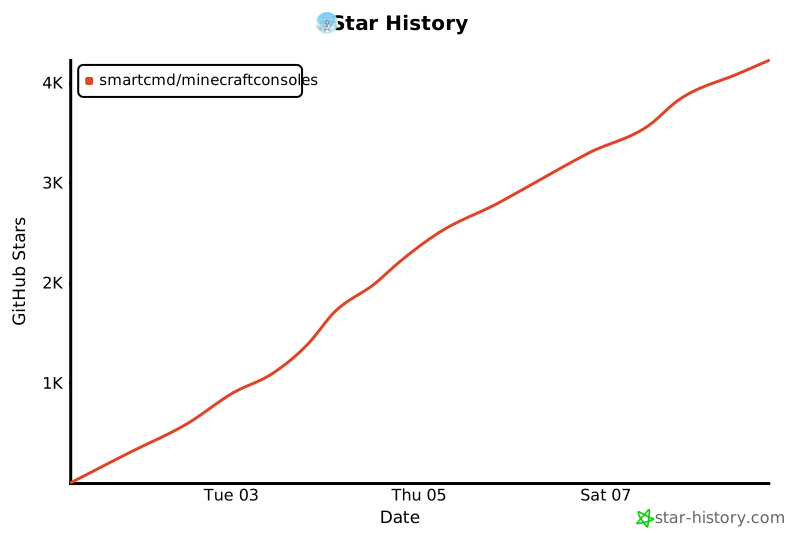](https://www.star-history.com/?spm=a2c6h.12873639.article-detail.7.7b9d7fabjNxTRk#smartcmd/MinecraftConsoles&type=date&legend=top-left) |